
Brand voice
The Brand voice box lets you tell AI how your replies should sound — the details that make a reply unmistakably yours. Every AI reply follows what you write here.
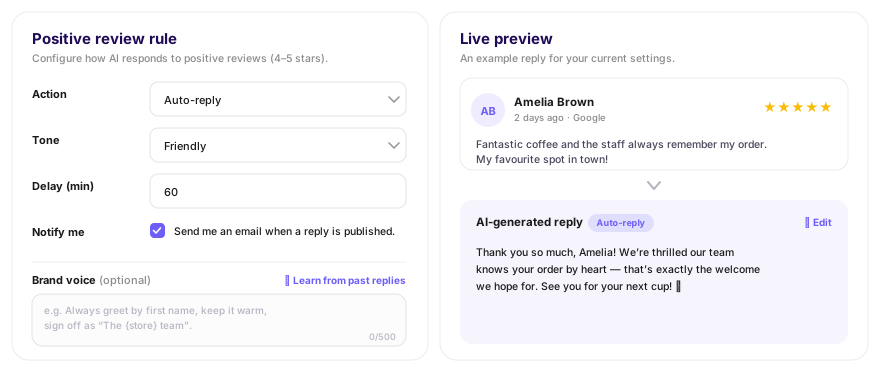
- Add house-style rules, e.g. "Always greet by first name", "Sign off as 'The {store} team'", "Never promise discounts".
- Keep it under 500 characters — short, clear instructions work best.
- It's optional — leave it blank and AI uses your chosen tone alone.
Learn from past replies
Instead of writing a brand voice from scratch, you can let AI learn it from the replies you've already written.
- 1Click Learn from past replies.
- 2AI reads your recent Google review replies and drafts a brand-voice description.
- 3Review the text, tweak anything, and save.
Note ·You need a few past replies for this to work. If you haven't replied to many reviews yet, write a brand voice by hand instead.
The live preview
The Live preview on the right shows a real, recent review from your account and the reply AI would write for your current settings.
- Regenerate — produce a fresh reply with the same settings.
- Edit reply — tweak the preview text to see how an edit reads.
Tip ·The preview is free — it never uses a credit and never posts anything. Use it to fine-tune your tone and brand voice before you save.